






star-1
star-2
Feature spotlight

Inspections

Inspections transform traditional paper checklists into intelligent digital forms that capture consistent data, photos, and automatically create follow-up actions. Whether for safety compliance, quality control, or routine maintenance checks, the inspection system ensures standardized procedures and professional documentation.

Digital inspection system that replaces paper forms and ensures compliance

Rigthand platformOperations
Creating Inspection Templates
hero-decorhero-decor-dark
walkingwalking-dark

What it does

Replaces paper inspection forms with customizable digital checklists that can be completed on mobile devices. Automatically generates professional reports, creates follow-up tasks for failed items, and maintains complete inspection history for compliance purposes. Works offline and syncs when connectivity returns.

Pro tip: Always include photos for failed inspection items - visual documentation speeds up repairs, provides training opportunities, and validates compliance efforts during audits.

5+

Workflow steps

8

Deep-dive modules

See how it works

From daily inspections to preventive maintenance—here's what your team does in Rigthand every day.

See all features below
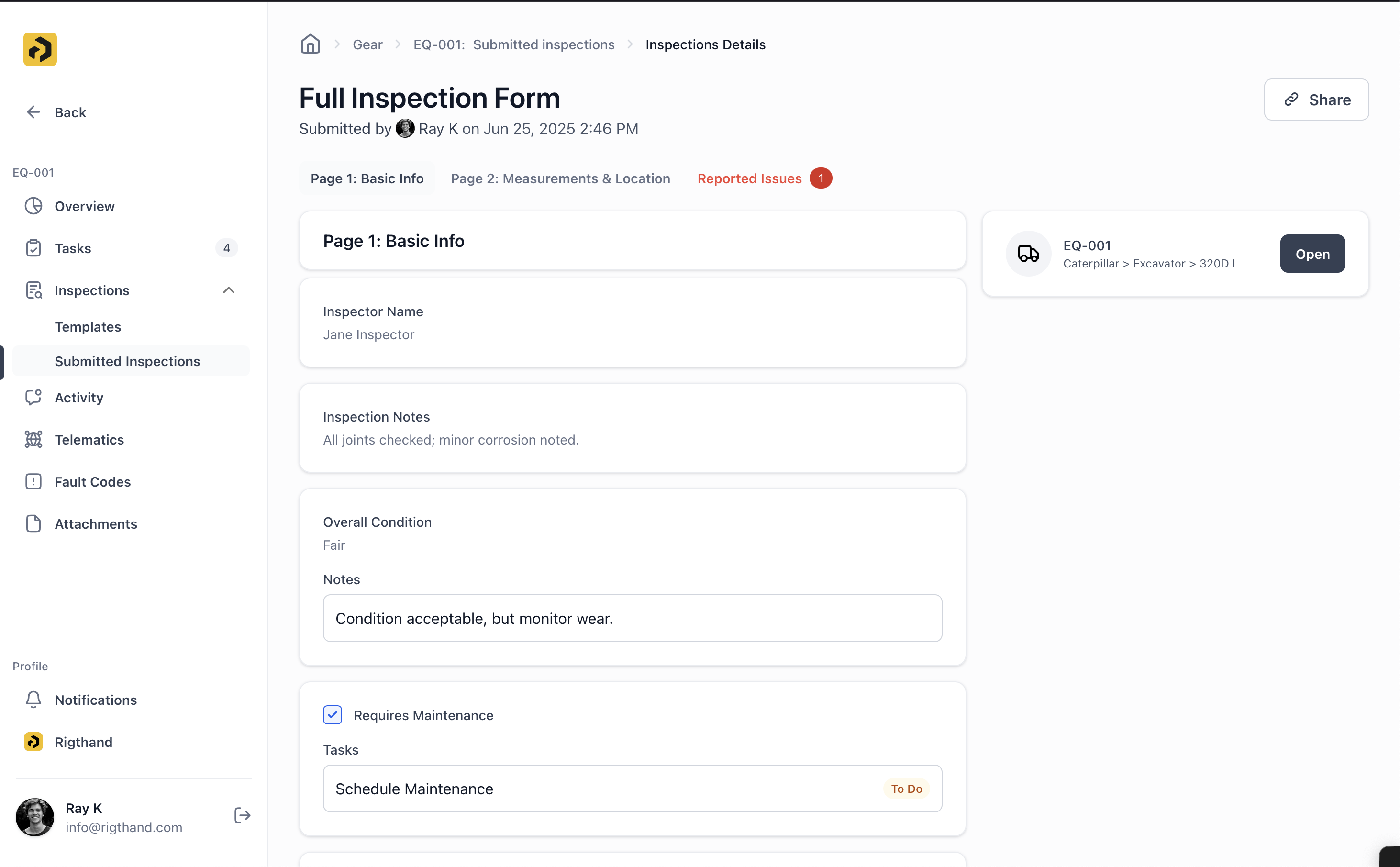
Creating Inspection Templates
01.

Inspection Templates

Create custom inspection forms using the drag-and-drop template builder. Templates ensure every inspection follows the same procedure and captures the same data points, improving consistency and reliability across your operation.

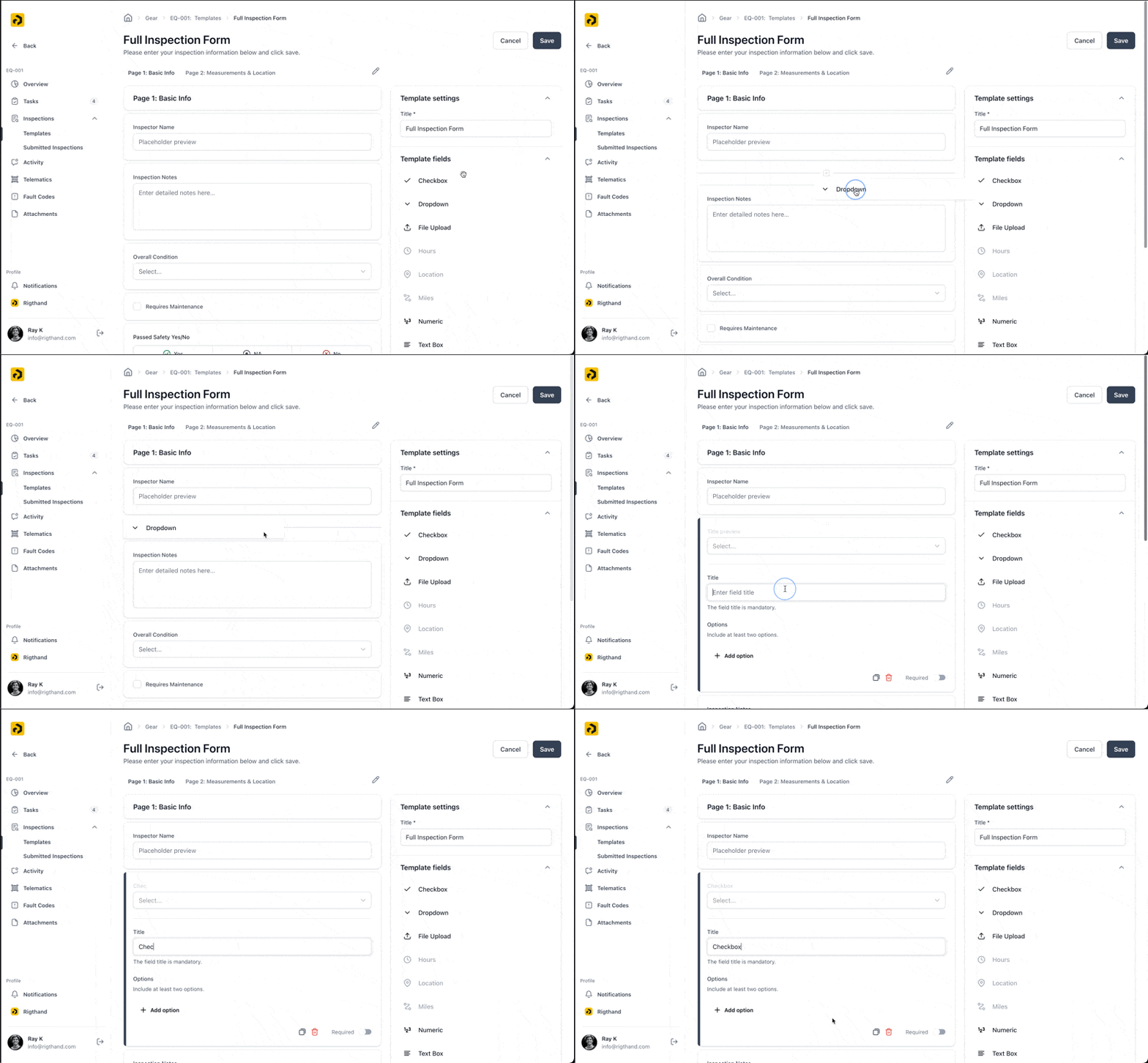
Submitting Inspection
02.

Available Field Types

• Checkbox: Simple yes/no or multi-option selections for quick evaluations • Dropdown: Predefined choice lists for standardized responses • File Upload: Attach photos, documents, and supporting materials • Hours/Miles: Update equipment usage metrics during inspection • Location: Capture GPS coordinates and location data • Numeric: Record measurements, readings, and quantitative data • Text Fields: Add notes, descriptions, and detailed observations • Yes/N/A/No: Three-option compliance checks for regulatory requirements • Date: Time-stamped entries for scheduling and historical tracking
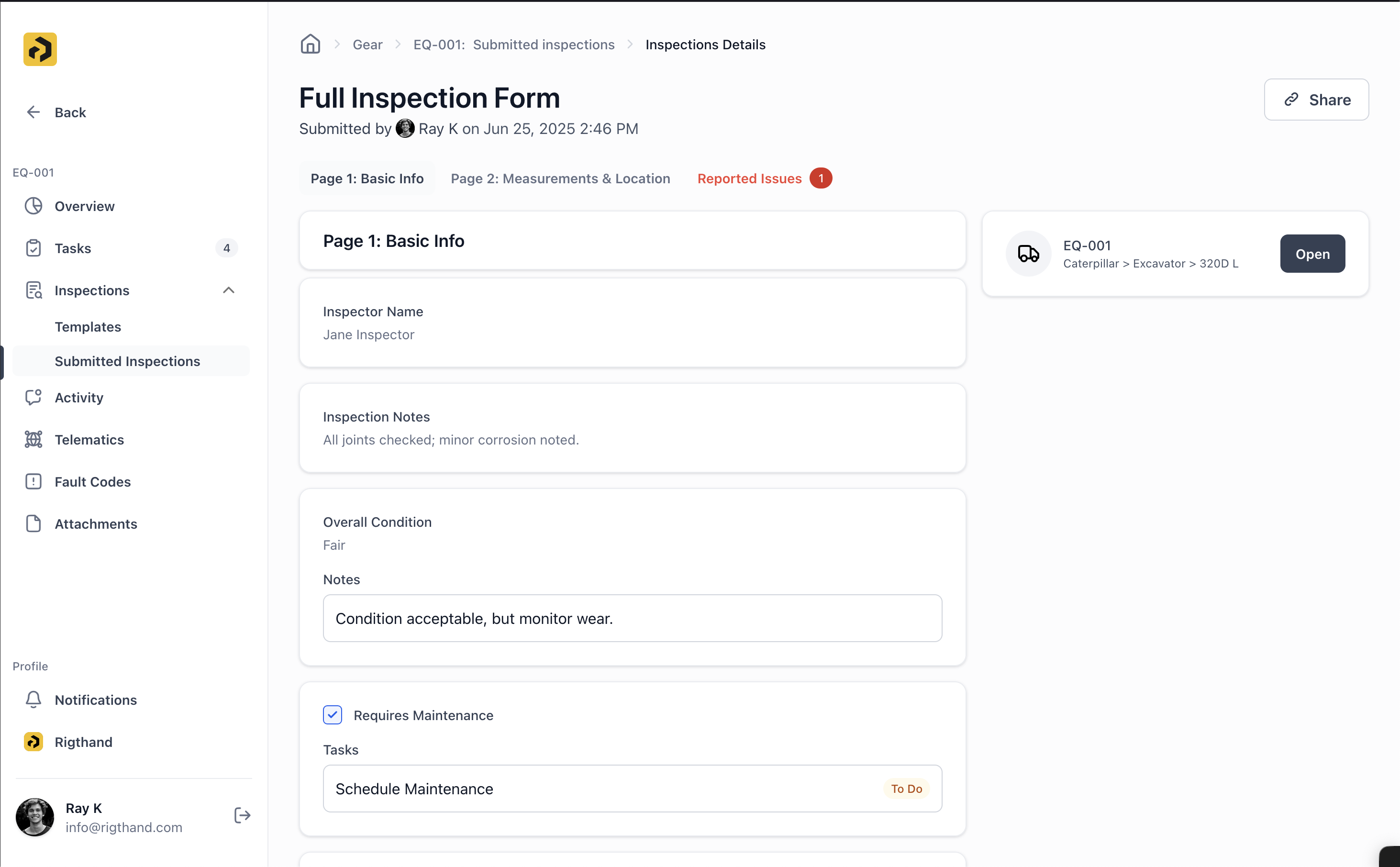

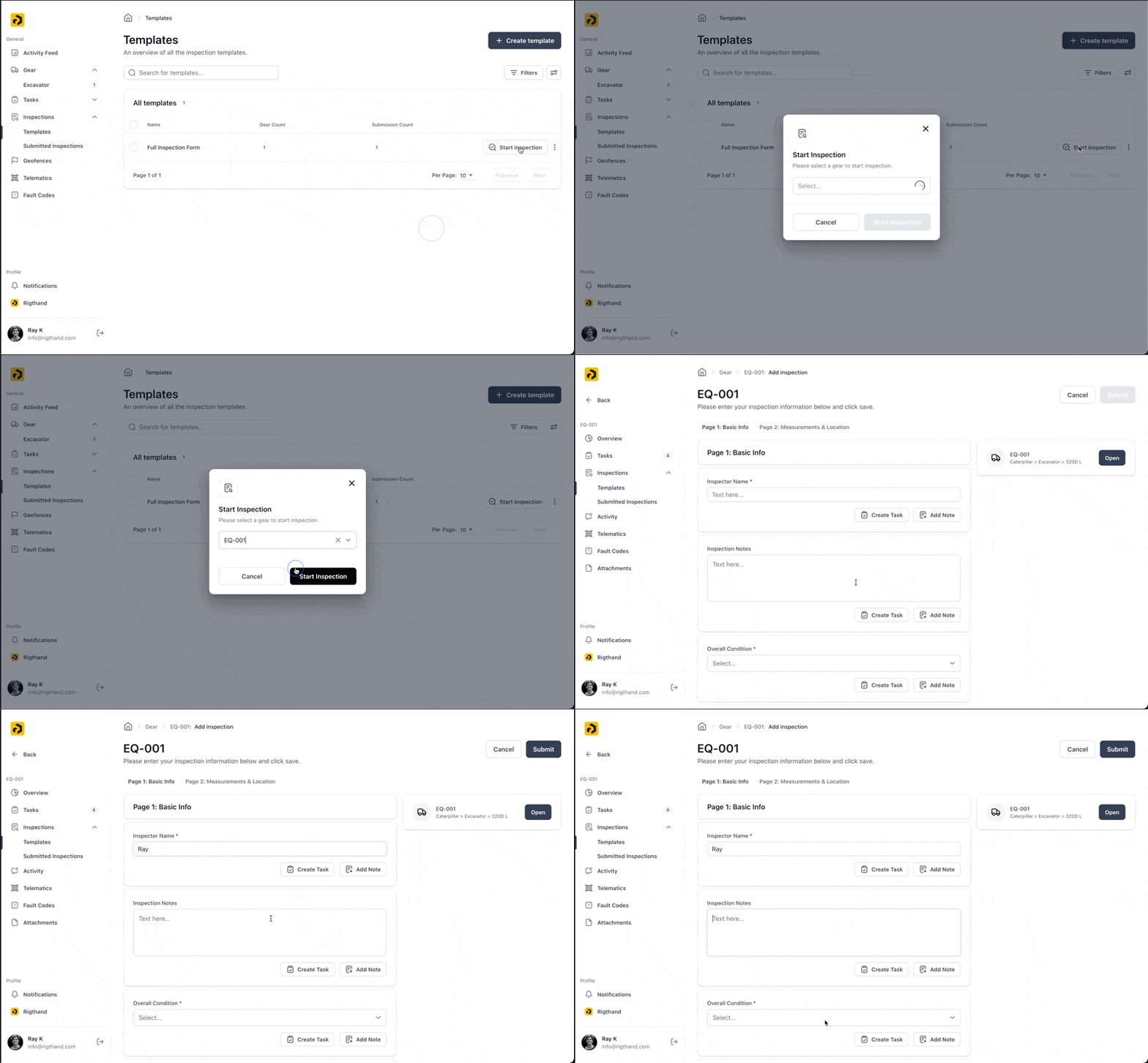
Submitted Inspection
03.

Smart Organization Features

• Multi-page Forms: Group related inspection items logically for easier completion • Validation Rules: Ensure data quality and completeness before submission • Equipment Assignment: Link templates to specific asset types for automatic selection • Metric Updates: Automatically update asset usage data from inspection entries


Creating Inspection Templates
04.

Conducting Inspections

The inspection process is optimized for mobile devices and real-world conditions. Inspectors can complete checklists quickly and thoroughly, even in challenging environments without internet connectivity.


Submitting Inspection
05.

Inspection Process

1. Start Inspection: Select the appropriate asset and begin the checklist 2. Offline Capability: Complete entire inspections without internet connection 3. Issue Detection: Create tasks directly from problem areas during the inspection 4. Photo Documentation: Capture visual evidence with annotations and markup tools 5. Notes and Context: Add detailed observations for each inspection item


Submitted Inspection
06.

Draft System Features

• Auto-save: Inspection progress is saved continuously to prevent data loss • Resume Later: Pick up partially completed inspections from any device • Offline Sync: All data automatically uploads when internet connection returns • Device Protection: Never lose work due to device issues or power loss


Creating Inspection Templates
07.

Inspection Reporting

Every completed inspection automatically generates a professional report that can be shared with supervisors, customers, or regulatory agencies. Reports include all inspection data, photos, and follow-up actions in a clean, branded format.


Submitting Inspection
08.

Reporting Features

• Instant Reports: Generate professional PDFs immediately upon completion • Issue Summary: Automatic compilation of problems found and actions created • Public Sharing: Share completed inspections with external stakeholders via secure links • Compliance Ready: Meet regulatory documentation requirements for safety and quality audits • Historical Archive: Maintain complete inspection history for trend analysis and compliance


How to use it

Safety Compliance

Conduct required safety inspections with standardized checklists

Quality Control

Perform pre-delivery or acceptance inspections with photo documentation

Preventive Maintenance

Include inspection steps in routine maintenance procedures

Audit Preparation

Maintain inspection records for regulatory compliance

Training

Use inspection checklists to ensure consistent procedures across team members

Everything you need for your equipment.

Activity Feed

See every action across your fleet in real time—one simple feed for everything happening.

Asset Management

Track all your equipment in one place—specs, location, and maintenance history.

Asset Dashboard

Get a complete view of each piece of equipment—current status and full history together.

Tasks (Work Orders)

Manage work orders digitally. No more paperwork, no more hassle.

Inspections

Replace paper forms with digital checklists. Simple to use, easy to find later.

Custom Fields

Add your own data fields to assets and tasks. Make it work your way.

Custom Views

Save your favorite filters and layouts. Find what you need faster.

Telematics Integration

Connect your equipment to pull in location, usage, and performance data automatically.

Fault Codes

Catch equipment problems early with automatic fault code tracking and alerts.

Geofences

Set virtual boundaries and get alerts when equipment moves where it shouldn't.

Notification Center

Keep everyone in the loop with smart notifications sent at the right time.

Offline Capabilities

Work without internet. Everything syncs when you're back online.

Zapier Integration

Connect Rigthand to 5,000+ apps. Automate workflows and skip the duplicate data entry.

Automations

Set up rules to handle repetitive tasks. Let the system do the busy work.

thinkingthinking-dark
send-messagesend-message-dark
star-2
star-1

Ready to get started?

Contact us to learn more about this feature and how it can help your operation.

Contact us