





star-1
star-2
Feature spotlight

Notification Center

The Notification Center ensures critical information reaches the right people at the right time through multiple communication channels. The system intelligently routes notifications based on user roles, asset assignments, and task ownership to minimize noise while ensuring nothing important is missed.

Intelligent communication system that keeps everyone informed

Rigthand platformOperations
Notification Center interface
hero-decorhero-decor-dark
walkingwalking-dark

What it does

Automatically generates and delivers targeted notifications based on system events, user assignments, and organizational hierarchy. Manages communication preferences and ensures critical information reaches decision-makers promptly while avoiding notification overload.

5+

Workflow steps

3

Deep-dive modules

See how it works

From daily inspections to preventive maintenance—here's what your team does in Rigthand every day.

See all features below
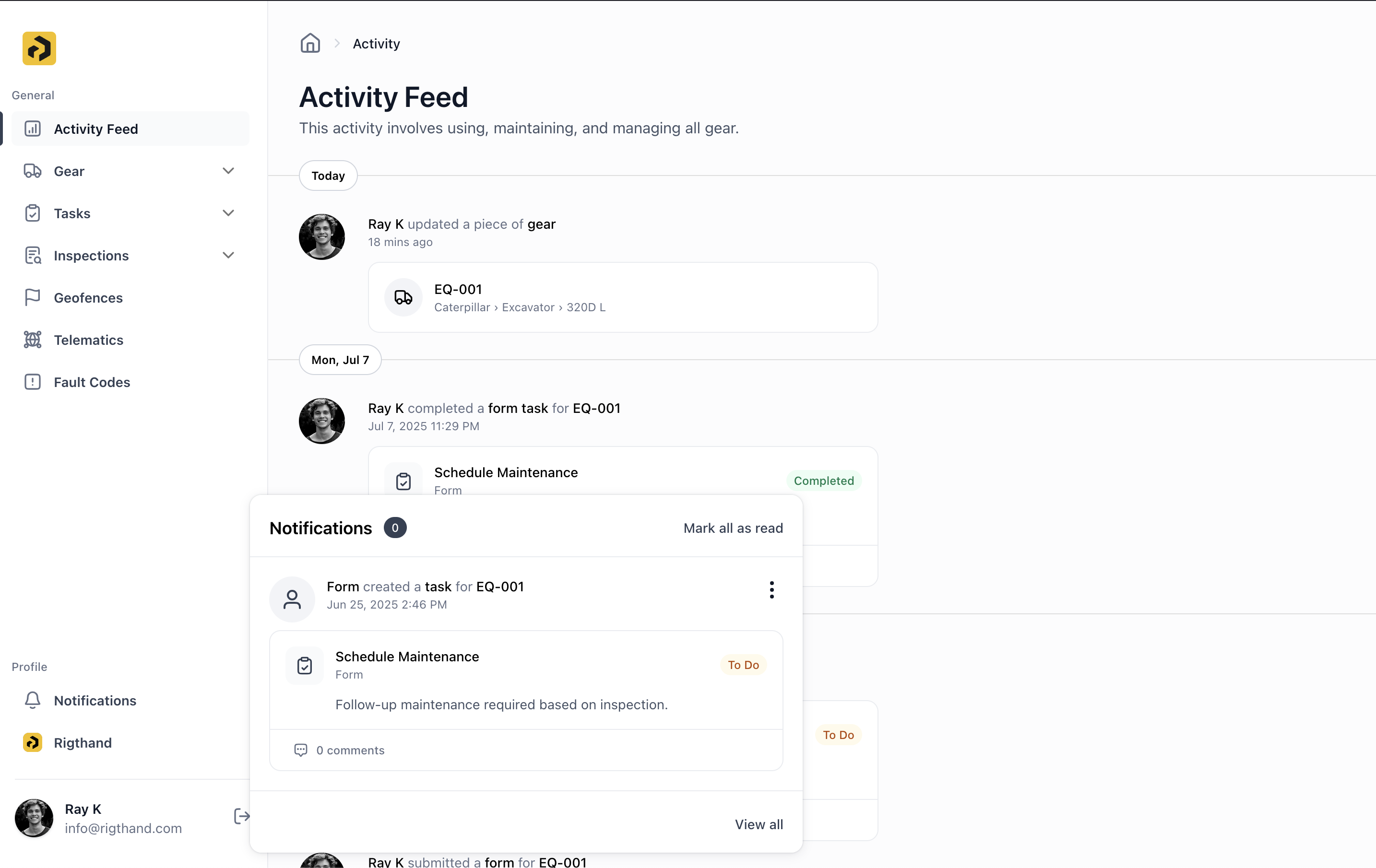
Notification Center interface
01.

Notification Types

• Web Notifications: In-app alerts visible when using Rigthand • Push Notifications: Mobile device notifications for immediate awareness • Email Notifications: (Coming Soon) Traditional email alerts for detailed information


Notification Center interface
02.

Intelligent Routing System

• Asset Assignment: Receive all notifications for equipment assigned to you • Task Assignment: Get updates when tasks are assigned to you or your team • Mentions: Direct notifications when mentioned in comments or updates • Escalations: Automatic alerts for overdue items or critical issues • Management Rollup: Supervisors receive summary notifications for their teams


Notification Center interface
03.

Hierarchical Notification Flow

The system understands organizational relationships and routes notifications accordingly. Equipment assignments, task ownership, and team structure ensure everyone gets relevant information without being overwhelmed by unnecessary alerts.


How to use it

Task Management

Stay informed about work assigned to you or your team

Asset Monitoring

Receive updates about equipment you're responsible for

Escalation Management

Ensure overdue items get management attention

Team Coordination

Keep supervisors informed of progress and issues

Emergency Response

Immediate alerts for critical equipment problems

Everything you need for your equipment.

Activity Feed

See every action across your fleet in real time—one simple feed for everything happening.

Asset Management

Track all your equipment in one place—specs, location, and maintenance history.

Asset Dashboard

Get a complete view of each piece of equipment—current status and full history together.

Tasks (Work Orders)

Manage work orders digitally. No more paperwork, no more hassle.

Inspections

Replace paper forms with digital checklists. Simple to use, easy to find later.

Custom Fields

Add your own data fields to assets and tasks. Make it work your way.

Custom Views

Save your favorite filters and layouts. Find what you need faster.

Telematics Integration

Connect your equipment to pull in location, usage, and performance data automatically.

Fault Codes

Catch equipment problems early with automatic fault code tracking and alerts.

Geofences

Set virtual boundaries and get alerts when equipment moves where it shouldn't.

Notification Center

Keep everyone in the loop with smart notifications sent at the right time.

Offline Capabilities

Work without internet. Everything syncs when you're back online.

Zapier Integration

Connect Rigthand to 5,000+ apps. Automate workflows and skip the duplicate data entry.

Automations

Set up rules to handle repetitive tasks. Let the system do the busy work.

thinkingthinking-dark
send-messagesend-message-dark
star-2
star-1

Ready to get started?

Contact us to learn more about this feature and how it can help your operation.

Contact us